
クイックスタート Quick start
このセクションでは、アカウント情報を受け取った方がまずはアプリを始めるための情報を提供します。 This section provides information to help you get started once you have received your account details.
1. 開始するには 1. To get started
開始するには、まず管理者アカウントにログインして「フォームの作成」「招待QRコードの生成」を行う必要があります。 To get started, you need to log in to your administrator account and create a form and generate an invitation QR code.
ご利用は月額制で、無料トライアルをご利用可能です。詳しくは公式サイトをご覧ください。 The service is subscription-based, and a free trial is available. For more information, please visit official website.
2. 管理者アカウントへのログイン 2. Login to admin account
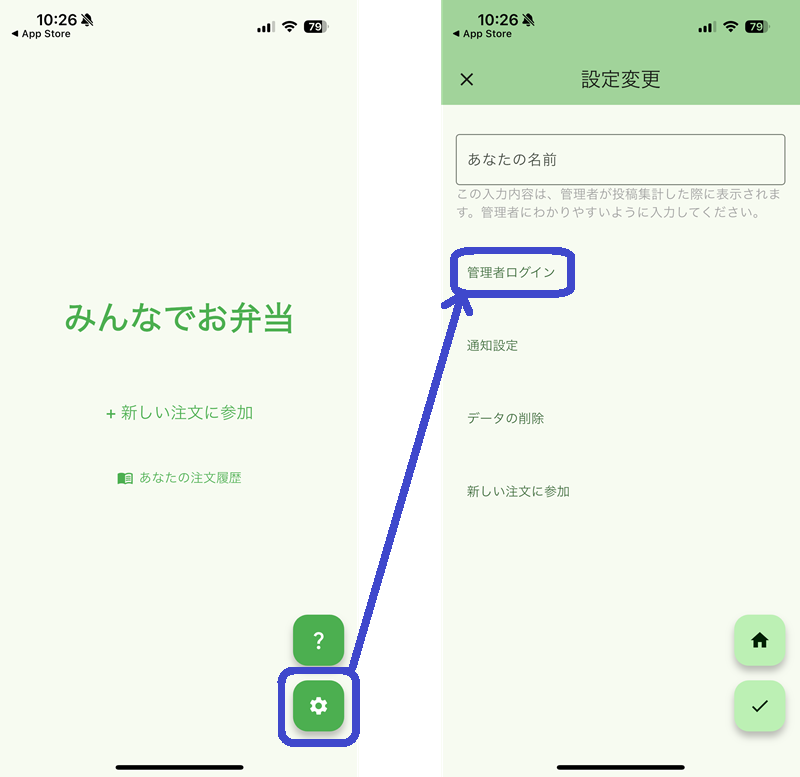
トップビュー→右下の設定ボタン(歯車マーク)→管理者ログイン、と進み、開発者から発行されたログインアカウントを使用してログインしてください。 Go to Top View → Settings button (gear mark) at the bottom right → Administrator Login, and log in using the login account issued by the developer.
ログインすると、トップビューに管理者メニューが表示されます。 After logging in, the administrator menu will be displayed in the top view.
3. 回答フォームの設定 3. Form settings
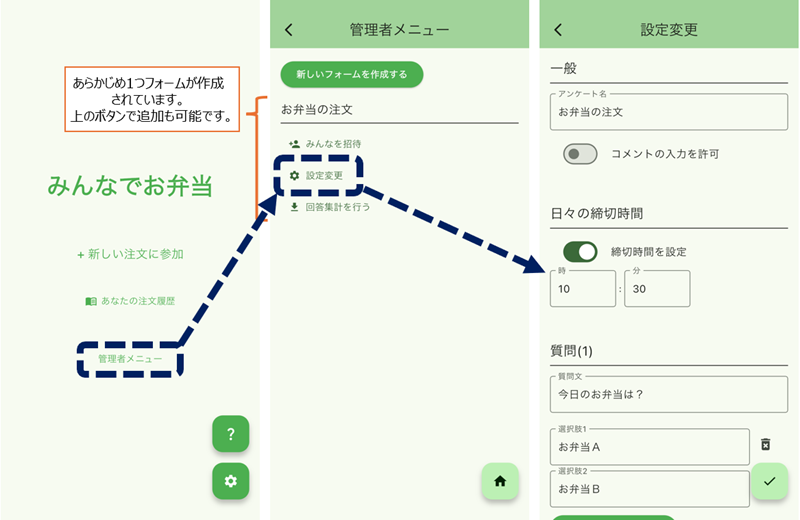
管理者メニュー→設定変更、で質問内容、選択肢、回答期限を設定します。 Set the question content, options, and response deadline in the administrator menu → Change settings.
4. 回答フォームへの招待 4. Invitation to response form
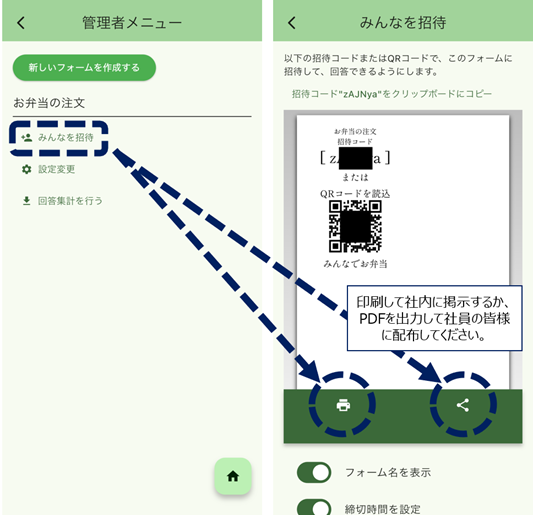
回答を受け付ける人を作成したフォームに招待するため、QRコード・テキスト招待コードを生成します。 Generate a QR code/text invitation code to invite the person who will receive responses to the created form.
管理者メニュー→みんなを招待、からQRコードを生成します。 Generate a QR code from the administrator menu → Invite everyone.
生成したシートは、社内など分かりやすい位置に掲示してください。 Please post the generated sheet in an easily visible location, such as within your company.
5. 回答フォームへの回答と集計 5. Responses to the response form and summarize
QRコードを読み込むと、回答ができるようになります。 By scanning the QR code, you will be able to answer.
回答の集計は、管理者メニュー→回答集計を行う、から実行できます。 Summary of responses can be performed from the administrator menu → Summarize of responses.
社内の一般ユーザーの使用方法及び案内 Instructions and guidance for internal general users
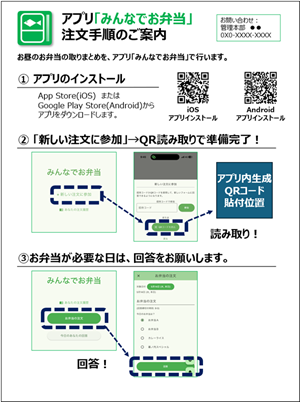
一般ユーザーは、管理者が発行したQRコードをスマホで読み取るだけで、注文に参加できます。
(QRコードは、クイックスタートの「回答フォームへの招待」をご参照ください。)
General users in your company can participate in the order process simply by scanning the QR code issued by the administrator with their smartphone.
(For details on the QR code, please refer to "Invitation to response form" in the Quick Start section.)
【社内配布用】アプリ「みんなでお弁当」注文手順のご案内 をダウンロード
(pptx形式)
 Download "For your internal distribution_ordering-procedures"
(pptx format)
Download "For your internal distribution_ordering-procedures"
(pptx format)